
.png)
Approval Workflow
Add an optional review step before a manifest is published from the Project Navigator to the CDM Library. Submit manifests for review, assign reviewers, track decisions, and collaborate through comments before shared models change.


Submit a Manifest for Review
Submit a manifest for approval directly from the Project Navigator. The manifest becomes read-only while the request is active, keeping its content stable during review.

Reviewer Roles & Responsibilities
Assign Requesters, Reviewers, and Admins distinct responsibilities in the workflow — submitting requests, approving or rejecting changes, and configuring organization-wide approval behavior.

Review Decisions
Reviewers approve, reject, or request changes on a submitted manifest, with every decision tracked against the request.

Comments & Collaboration
Discuss a manifest under review using threaded comments — ask for clarification, leave implementation notes, and resolve discussions once addressed.
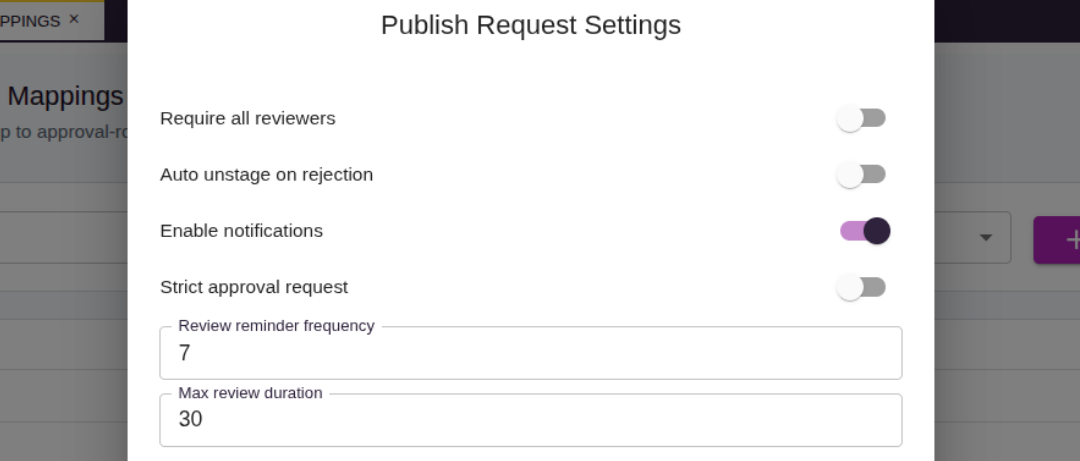
Approval Settings & Configuration
Configure organization-wide approval behavior — required reviewers, reminder frequency, maximum review duration, and whether publishing is blocked while changes are requested.

Publish & Unpublish to the CDM Library
Publish a manifest to the CDM Library once all required reviewers approve it, and unpublish it later if the manifest owner, a Manager, or an Admin needs to withdraw it.